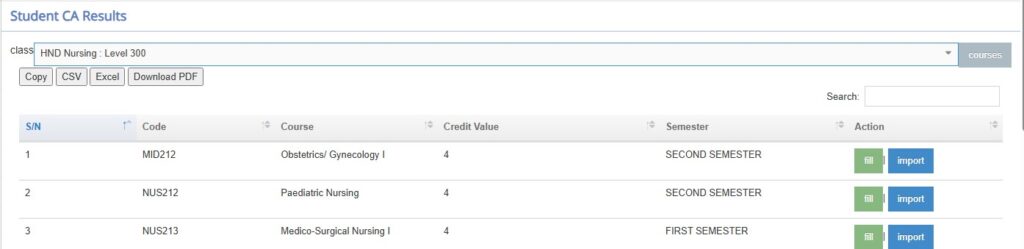
Permits importation of exams marks per courses of a given class per semester.
For the Exam marks importation
- Select the class you wish to import exam marks for the courses in that given class.
- All the courses in that given class will appear you can choose to fill manually by clicking Fill and input the exam mark per student per course.
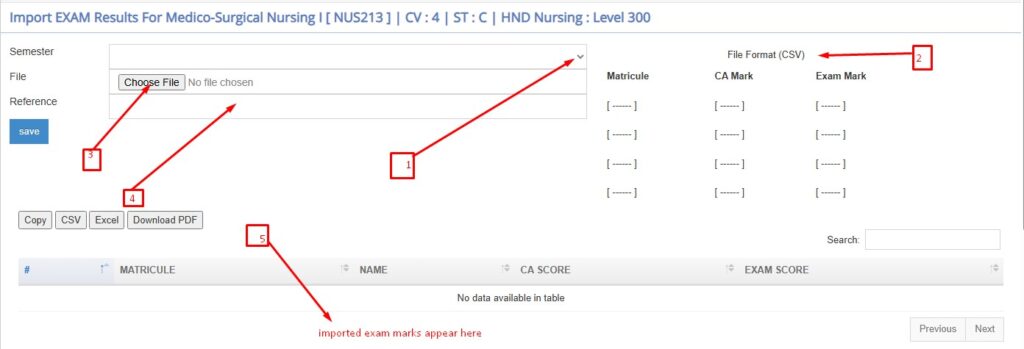
- Choose or click Import if the marks are in the csv format to upload exam marks for all the students of that given class offering that course. NB: The excel sheet should have 3 columns matricule, CA mark and exam mark saved as CSV.
- Take note of the semester you are importing its exam marks, choose the CSV file with the matricule, CA mark and exam mark save and add a reference e.g NUS213 exam marks.